• Thank you all very much for sharing your time with us in 2025. We hope you all have a safe and happy 2026!

How to hook up Stereo speakers to PC?

chinesepug

Distinguished
Nov 8, 2012
8
0
18,510
Can anyone tell me what adapter I need to hook up my stereo speakers to my PC? I was going to use the stereo speakers hooked up to the receiver, then somehow buy an adapter/cord and plug it in the back of the receiver to my PC.

Is this even possible?
 
Solution
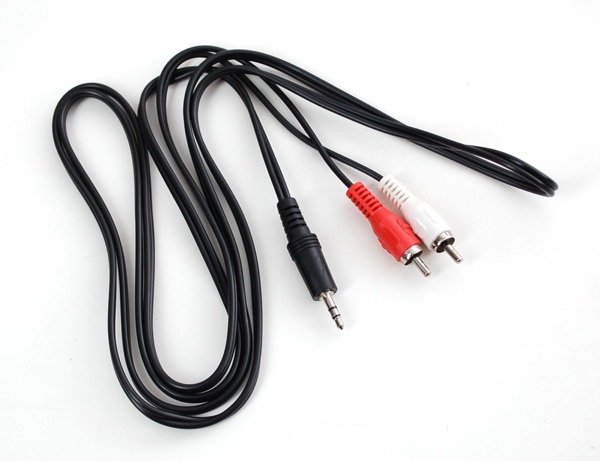
If your receiver only has L/R audio inputs then you'll need to use the 3.5mm stereo to L/R audio adapter cable (available from RadioShack and other electronic stores). You'd connect the cable to your computer's green audio out port and to your receiver's Video/Aux Red/White audio input port.

The cable you need looks like this:

window-335.jpg


-Wolf sends
This is all going to depend on what inputs your receiver has. The three main connections used are 3.5mm stereo to L/R audio cable, S/PDIF Coaxial/TOSLink Optical, or HDMI from the graphics solution.

-Wolf sends
 
I have:

Video/Aux
MD
Line Out
Super woofers
speaker IMP: 8 - 16
surround speakers
(Red) speakers IMP: 6
(Black) speakers

all these slots have L and R slots
 
If your receiver only has L/R audio inputs then you'll need to use the 3.5mm stereo to L/R audio adapter cable (available from RadioShack and other electronic stores). You'd connect the cable to your computer's green audio out port and to your receiver's Video/Aux Red/White audio input port.

The cable you need looks like this:

window-335.jpg


-Wolf sends
 
Solution