
Laptop CPU at 118C?! Help Please.

patrick47018

Honorable
Jan 14, 2013
219
0
10,910
Hello everyone. I recently bought this laptop second hand: http://support.hp.com/us-en/document/c03502358

And using HWMonitor is reads the CPU temp of 118C. The air coming from the vent on the side left rear is very warm. Neither the top nor the bottom of the laptop itself feels warm though. Think the temp is legit? And if so what should I do about it?
 
Hi

Most bios have a page indicating cpu temperature and psu voltages
If you reboot , go into bios you should get some idea of real temperature

While running windows and a game or watching a video see what cpu-z thinks cpu speed is
At that temperature the cpu should be throttled back or the system will crash
Assuming deg C not deg F

I think max allowable cpu temp is 100C

There should be abig difference when running windows and office or similar applications or browsing the Internet and playing games or running cpu testing programs

Regards
Mike Barnes
 
If the temperature is read in Fahrenheit degrees, it's nothing worrisome (and actually very cool); if it's in Celsius tho, it's terribly wrong and should actually trigger a "thermal event" shutdown...
As far as I know, that APU should be rated for operation up to 100 Celsius degrees, and you're way above that...

Can you confirm the measurement unit used is Celsius? Do other softwares also report the same temperature?
 
That is not good, most cpus and gpus max temp is 100 degrees for heavy intensive use. If this is happening while browsing then something is definitely wrong.
 
I call a wrong sensor read...
You're almost 20 degrees above the max operating temperature for that chip, it should just shut down instantly.
Try using other tools such as CoreTemp or Speedfan and try measuring the temps there. if they're still that high, request for an RMA if it's still under warranty or a repair from a professional if not.

The minimum frequency for your APU is 1.9ghz, and if the temp was legit it would just shut down entirely or be far below that speed...or at least, CPU-Z reading 2.3ghz is telling me that.
 
After updating BIOS and using it for a while, new common temp reads 85C and the air coming from the vent is cool on my hand. Looking promising and didn't really do much besides update drivers/BIOS
 
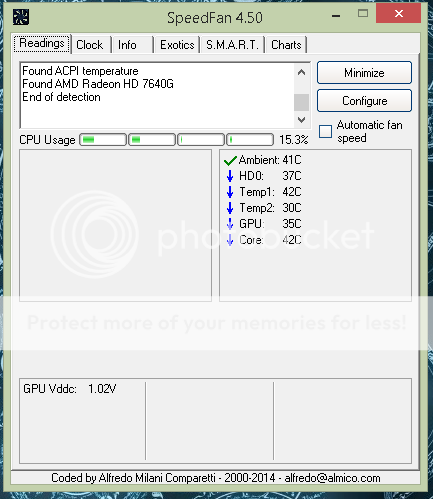
Capture_zpsytg8voks.png


Which of these is supposed to be the CPU?
 
Haven't used Speedfan in a while, but "Core" should be the general CPU temp. If you could try CoreTemp as well and it gave out similar readings, it would definitely mark this as a "wrong sensor reading" issue.

Those 118 celsius degrees were probably the motherboard's chipset temperature rather than the APU's one. Speccy tends to make this error often as well, to name another software.
 
CoreTemp reads my CPU temp as 0C. So it cannot see it all for some reason. But since it is now no longer spewing fire from the vent I think I am in the clear
 
They're all reading a different sensor...lol
No way to be absolutely sure of that at this point, and on that account, spewing some heat from the fans is a good thing, but not if you actually feel an INTENSE heat.

If you think you're clear, I'm glad for you. My OCD wouldn't let me go until I knew why, for the love of God, a BIOS update seems to have fixed what looked like a pretty serious issue 😛
