
Hi, I'm trying to upgrade the RAM on an old SAMSUNG NP300 laptop. It currently has 2GB of PC10600 DDR3 installed.
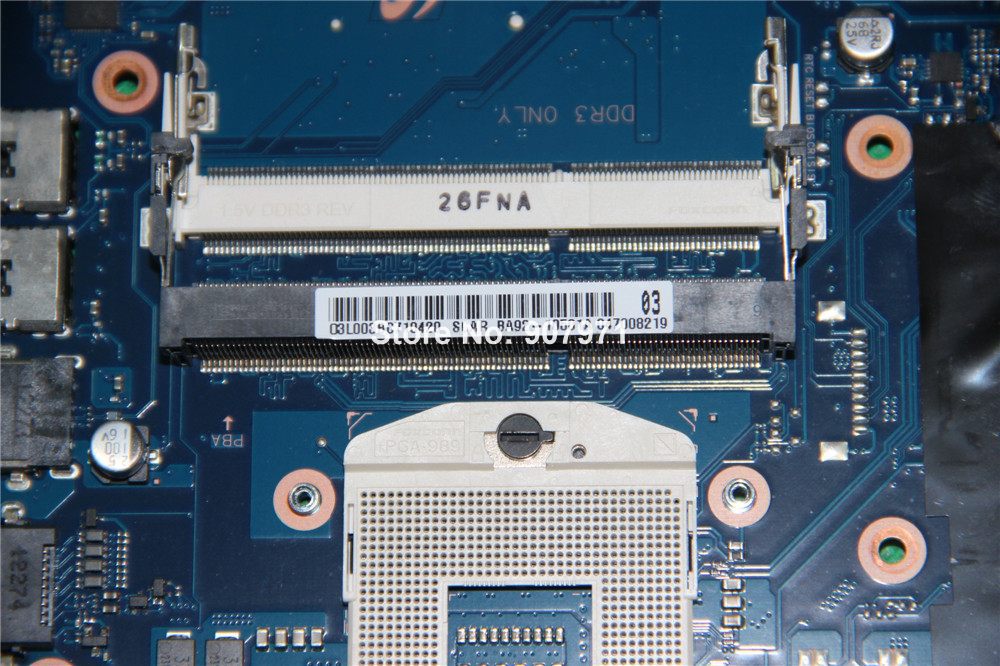
I wanted to add a SAMSUNG branded 4GB PC10600 module into the second slot, but it seems to be keyed differently on the left and right edges.
Am I missing something, or just being too careful? It really looks like this RAM won't fit in this slot without excessive force.
The ivory colored slot where the 2GB module is inserted appears to have different retention clips than the second (black) slot.
I would imagine that I could probably remove the 2GB module and put the 4GB in its place if all else fails, but I'd prefer to be able to keep the 2GB module in as well.
The module itself lines up perfectly with the keying in the slot, but the grooves on the left and right appear to be too high for the retention clips.
Any advice in this regard would be much appreciated. Thanks,
I wanted to add a SAMSUNG branded 4GB PC10600 module into the second slot, but it seems to be keyed differently on the left and right edges.
Am I missing something, or just being too careful? It really looks like this RAM won't fit in this slot without excessive force.
The ivory colored slot where the 2GB module is inserted appears to have different retention clips than the second (black) slot.
I would imagine that I could probably remove the 2GB module and put the 4GB in its place if all else fails, but I'd prefer to be able to keep the 2GB module in as well.
The module itself lines up perfectly with the keying in the slot, but the grooves on the left and right appear to be too high for the retention clips.
Any advice in this regard would be much appreciated. Thanks,



 Facebook
 Twitter