
- Feb 25, 2009
- 29
- 1
- 18,580
I wrote my first batch file in Notepad and save it as Firefox.bat:
@echo off
start firefox.exe
When I ran Firefox.bat, I got an error message reading:
Windows cannot find 'firefox.exe'. Make sure you typed the name correctly, and then try again.
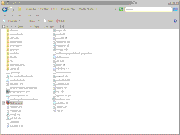
Firefox.exe it's clearly in its folder:
@echo off
start firefox.exe
When I ran Firefox.bat, I got an error message reading:
Windows cannot find 'firefox.exe'. Make sure you typed the name correctly, and then try again.
Firefox.exe it's clearly in its folder:



 Facebook
 Twitter